
Platform
Cover management software built around the school day
Cover Manager brings staff absence, lesson cover and duty rotas into one school-focused platform. When an absence is approved, the lessons and duties it affects are released for cover, fair suggestions are ready to review and staff are told what they are covering — on the web or the iPhone app, with supported onboarding for your school.
- Route planned leave to the right approver
- Record unexpected absence and see the cover gaps
- Review explained cover suggestions before confirming
- Manage weekly duty rotas alongside lesson cover
- Share lesson and duty cover fairly across the year
- Get started with supported Microsoft and MIS setup
Cover Manager by Education Host — designed and developed for UK schools and colleges.
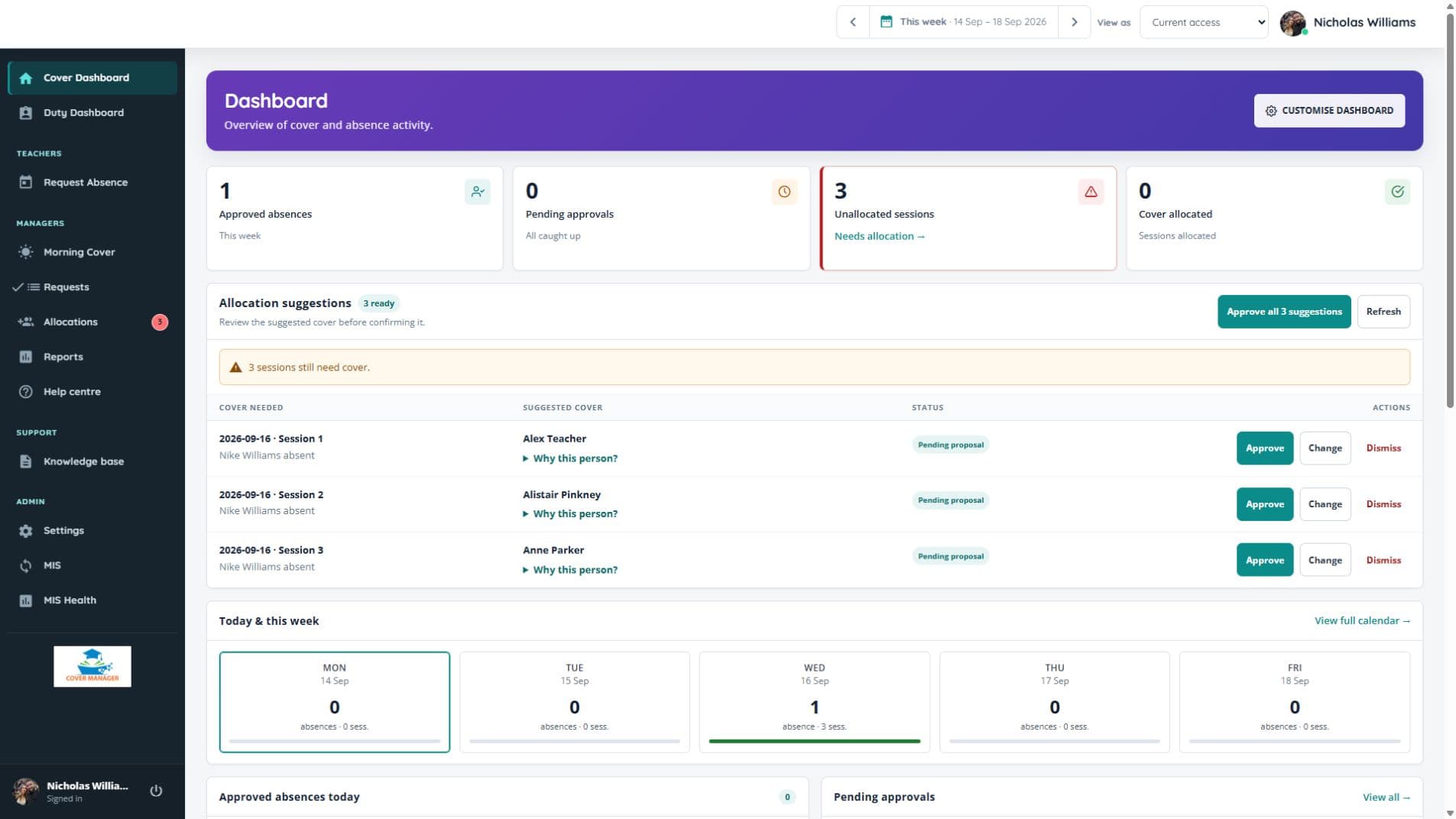
Real screens from Cover Manager
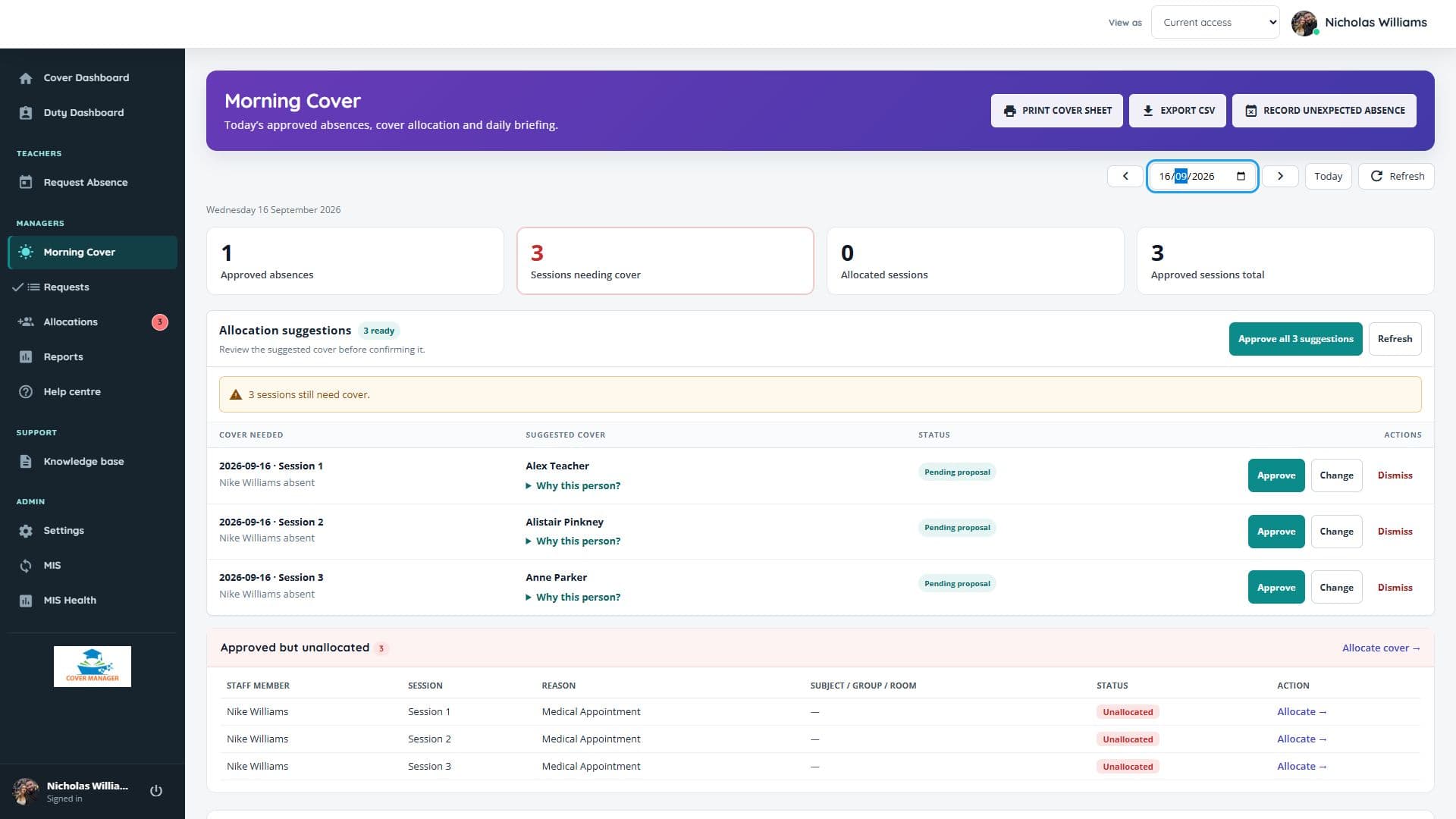
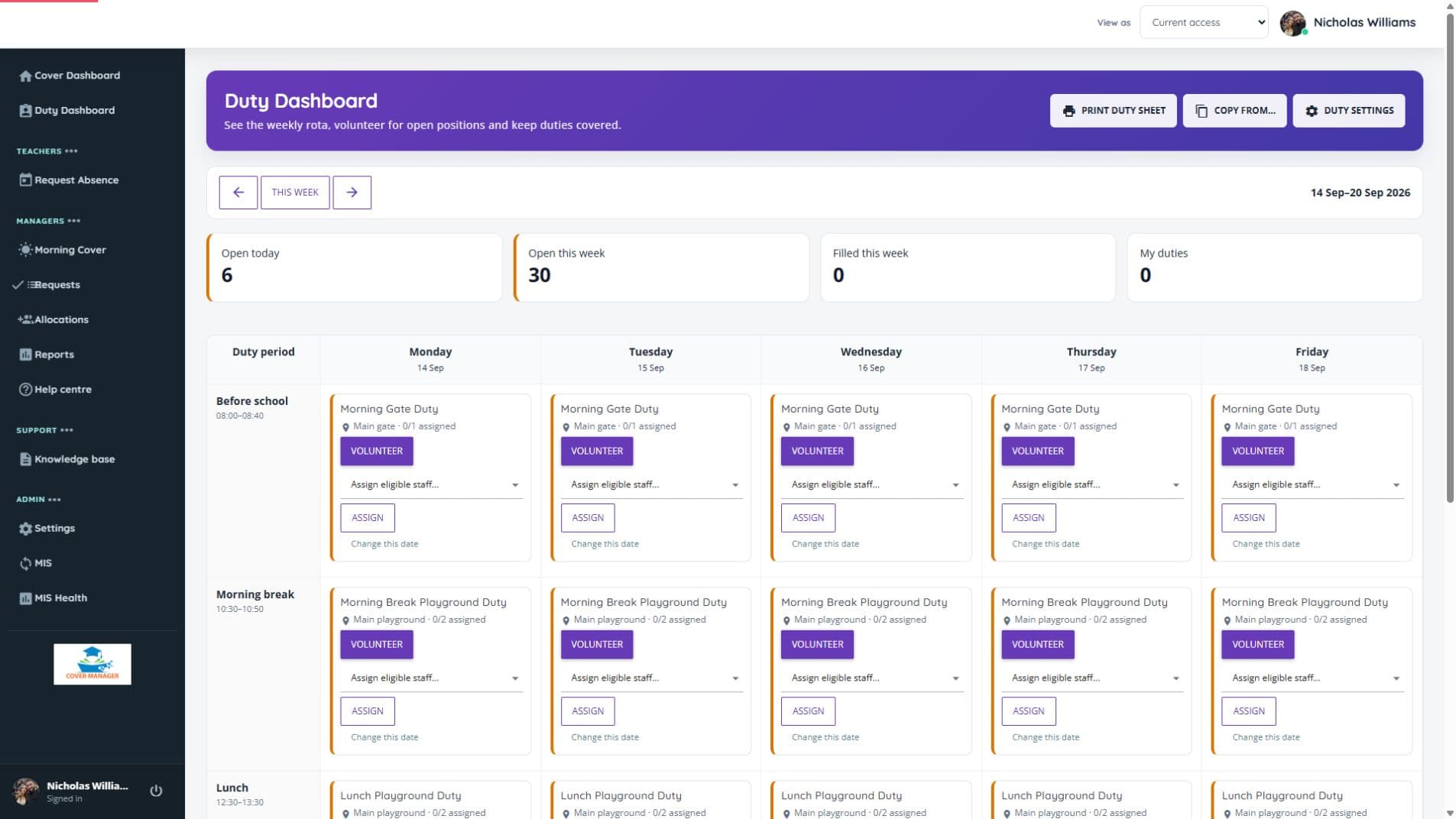
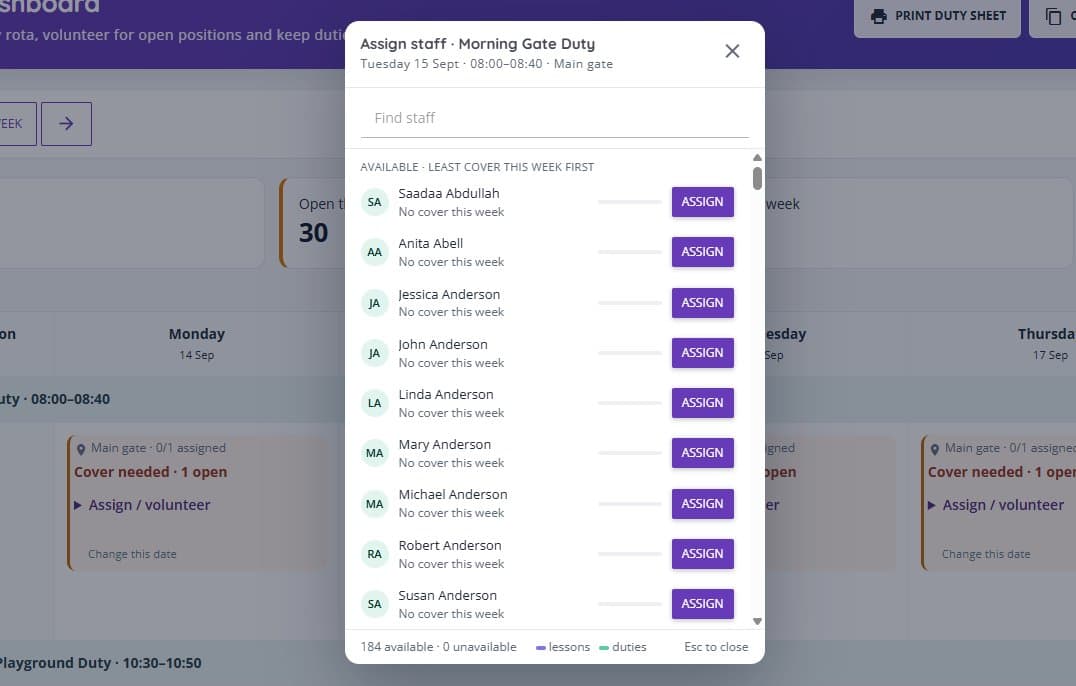
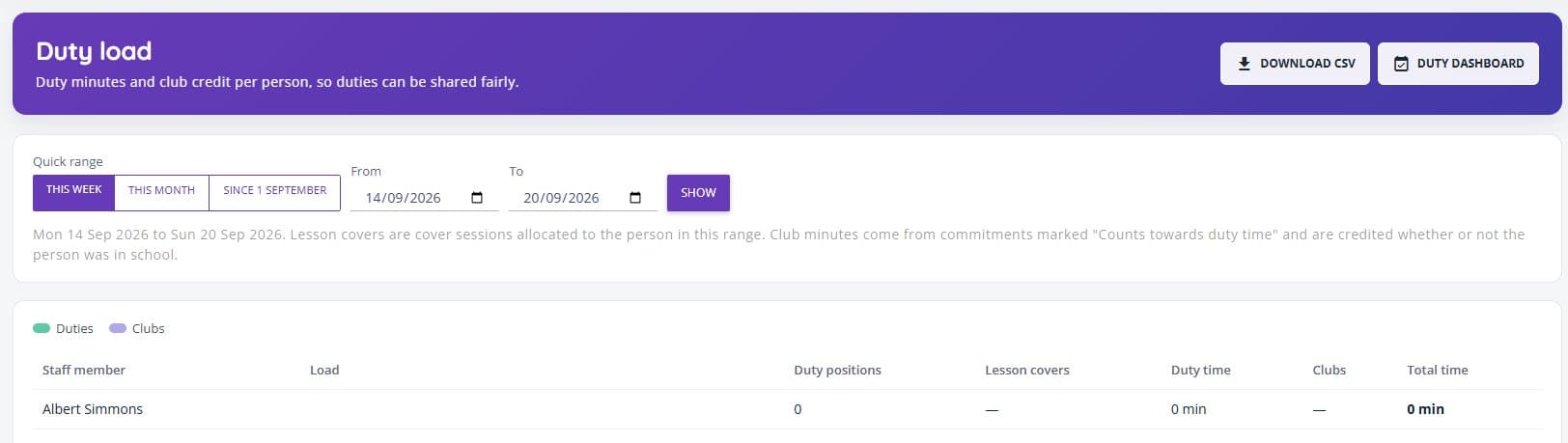
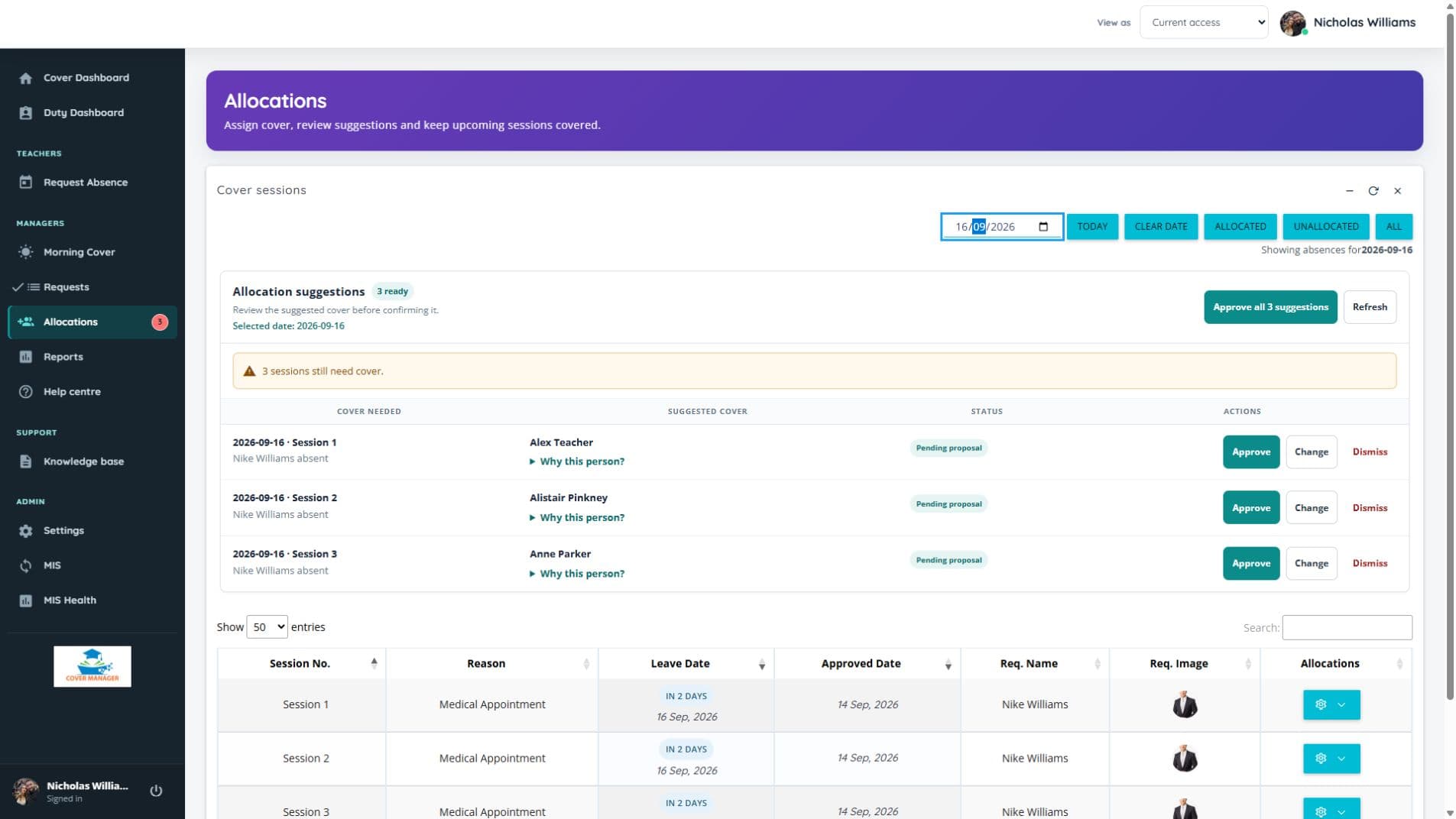
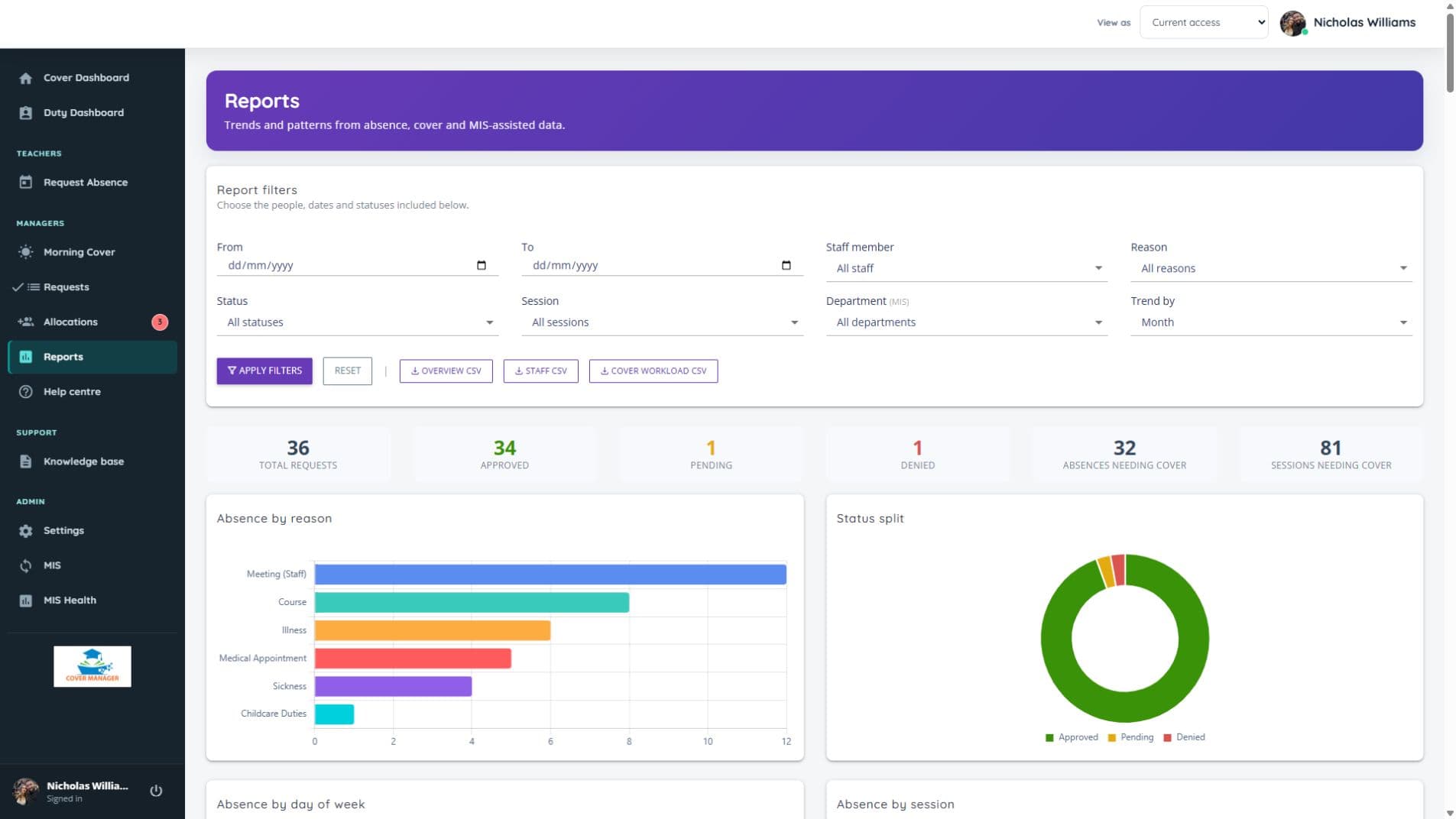
Current screens from the platform, using fictional demonstration records: Morning Cover, Duty Manager, duty cover assignment, duty load, allocations and reporting.
What is Cover Manager?
Cover Manager is a school-focused platform for managing staff absence, lesson cover and supervision duties. It brings requests, approvals, allocation, daily cover planning, duty rotas, cover work and reporting into one place, so school teams can work from the same information.
Follow the day from a planned leave request or an unexpected absence through to confirmed lesson cover and a printable daily briefing. Duty Manager extends that visibility to gates, breaks and lunchtime supervision, with unfilled positions clearly shown.
Designed and developed by Education Host around real school workflows, Cover Manager is cloud-hosted, supports Microsoft Entra sign-in, uses role-based access so each person sees only what they need, and treats cover work as optional — schools that only want absence, approval and allocation workflows can switch it off.
Almost everything is configurable: who approves each absence reason, how cover is shared out, who can cover each duty, who works part time, which emails each manager receives and whether staff can use the iPhone app.
Built for the 8am cover rush
When staff absence comes in, cover managers need to know what is approved, what is still unallocated, which lessons are affected and what needs to go on the daily cover sheet. Morning Cover brings all of it into one daily operational view — approved absences, allocated and unallocated sessions, MIS timetable context where available, and a printable cover sheet.
- Daily view of approved absences
- Record an absence for one member of staff or several at once, including school-arranged activities planned in advance
- Approved but unallocated sessions highlighted
- Allocated cover shown clearly
- Partial allocation handled properly
- Mark a lesson as No Cover Needed, for example when a class is out on a trip
- Print-friendly daily cover sheet, with duty cover listed below lesson cover
- CSV export for sharing or archiving
- MIS subject, group, room and period context where available
Who is covering the gates, breaks and lunch?
Duty Manager brings additional supervision into a weekly school rota. Set the times, locations and number of staff needed, then see filled and open positions together. It works independently of your MIS connection, so schools can organise duties alongside lesson cover.
- Build recurring weekly duty templates and manage date exceptions
- Assign eligible staff or let them volunteer for open duties
- Copy allocations between weeks, with availability and conflict checks
- Release affected duty assignments when an overlapping absence is submitted, and email duty managers who want to know
- See operational absence alerts without sharing private absence reasons
- Print a weekly duty sheet with unfilled positions marked
- Set who can cover each duty: restrict a duty to named staff, exclude others, and mark first-choice and last-resort people
- Record clubs and other commitments that block clashing duties or count towards a person's duty time
- Assign from a searchable list that shows who can cover, who can't and why, and who has done least this week
- Swap two people's duties, or hand a duty to someone else, from a chosen date onwards
Duty Managers control the rota, the eligible staff list and the cover rules. A Duty load report shows each person's duties, lesson covers and club time for the week or term, so supervision is shared fairly, and staff with a club that day are placed lower down the list. A released assignment is not silently restored if an absence is later rejected or withdrawn.
What happens when an absence is approved?
One approval updates everything that depends on it. Cover Manager works out the lessons that need cover from the timetable, releases any duties the person was rostered for, and takes them off any cover they were due to give, so nobody is left covering a lesson or a gate while they are away.
Lessons that need cover appear
Only the lessons the person teaches during the absence are listed for cover, with subject, class and room where timetable data is available.
Their duties are released
Duties that clash with the absence are released for cover. Duty managers who want to know are emailed a list, and a possible clash is flagged rather than guessed.
Their own cover is handed back
Any lesson cover they were due to give is released so it can be reallocated, and the change is recorded.
Fair suggestions are ready
Suggestions count lesson cover and duty cover together, so the same people are not asked for both.
Staff are told once
By default each person gets one email the school day before listing all their cover, and anyone taken off cover is told they are no longer needed.
Every email is optional for managers, who choose their own. Staff always hear about their own cover, and a requester always hears the decision. Absence reasons are never included.
Cover Manager in your pocket
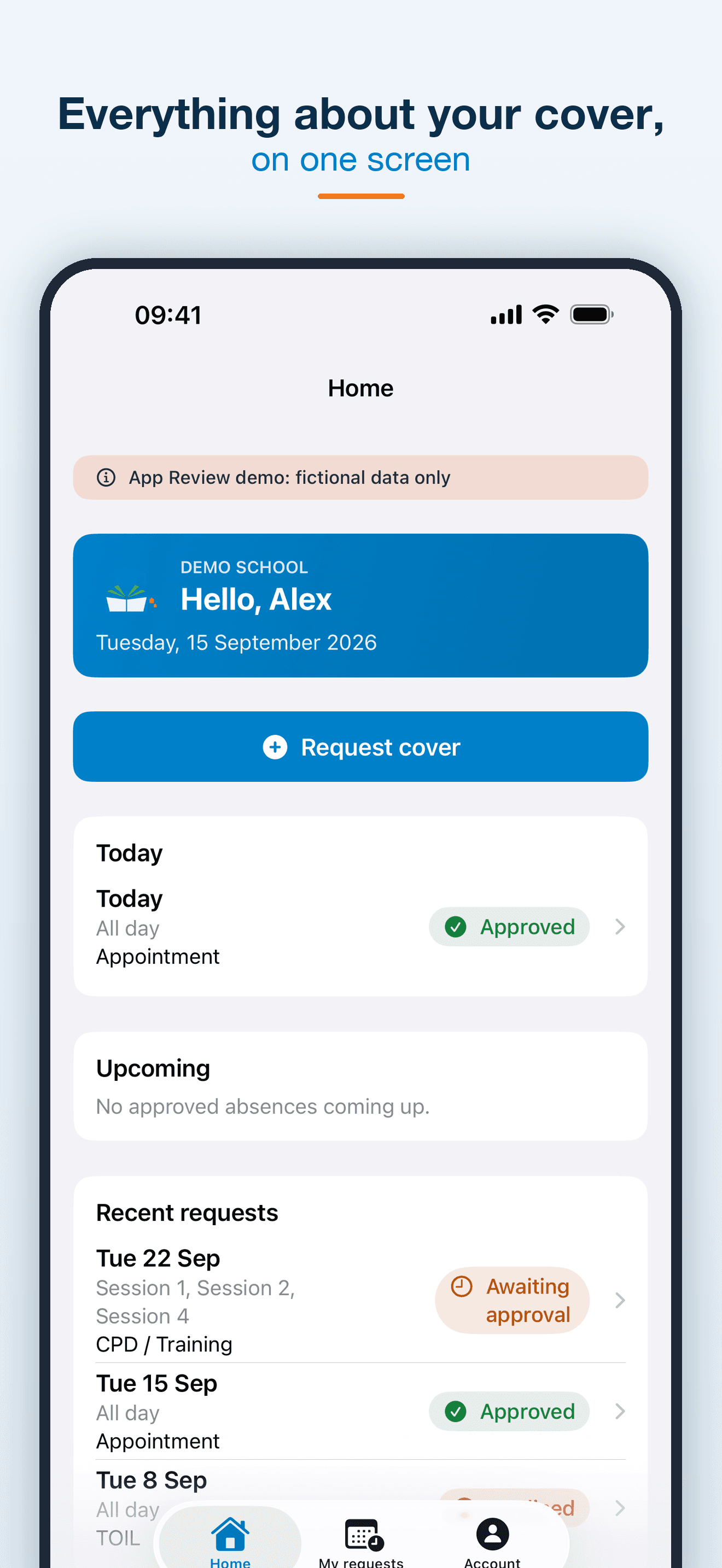
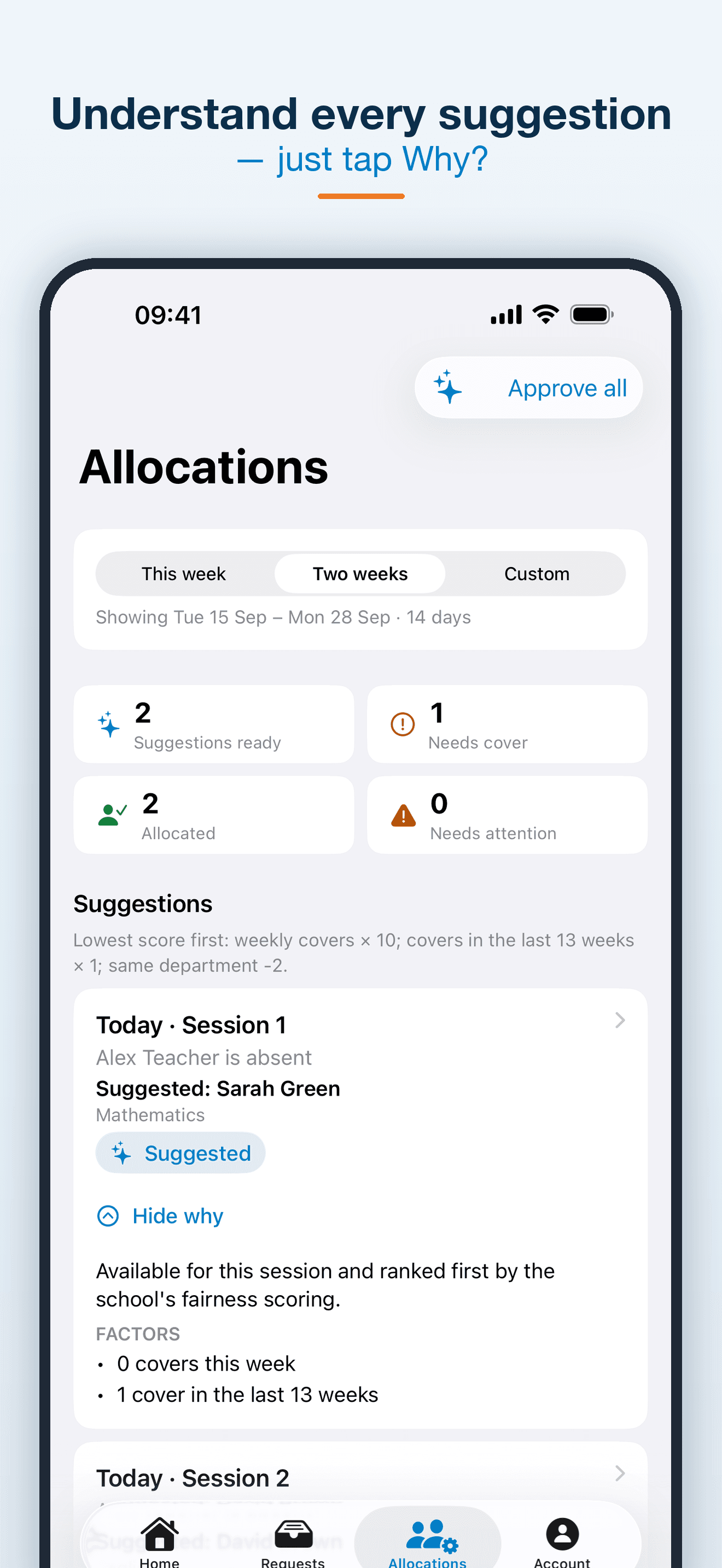
Cover Manager for Education is available on the App Store. Staff sign in with their school code and existing Microsoft account to request absence and follow each request to its decision. Managers can decide requests and review cover suggestions, with the reason behind each one.
- Request absence for whole days or chosen sessions
- See today's absence, upcoming cover and recent requests
- Decide staff requests from anywhere
- Review and approve cover suggestions, with the reason for each
- Schools choose whether staff can use the app, or use it without requesting absences
From spreadsheets and guesswork to one daily cover view
Without Cover Manager
- Absence requests handled through email or spreadsheets
- Cover gaps found manually
- Daily cover sheet built separately
- Timetable context checked in another system
- Cover work status unclear
- Duty rotas and cover lists kept in a separate spreadsheet
With Cover Manager
- Requests, approvals and allocation visibility in one system
- Approved but unallocated sessions highlighted
- Morning Cover gives a daily operational view
- MIS timetable context shown where available
- Daily cover sheet printed or exported from the platform
- Duty rules and staff commitments enforced automatically
Approval workflows that match school responsibility
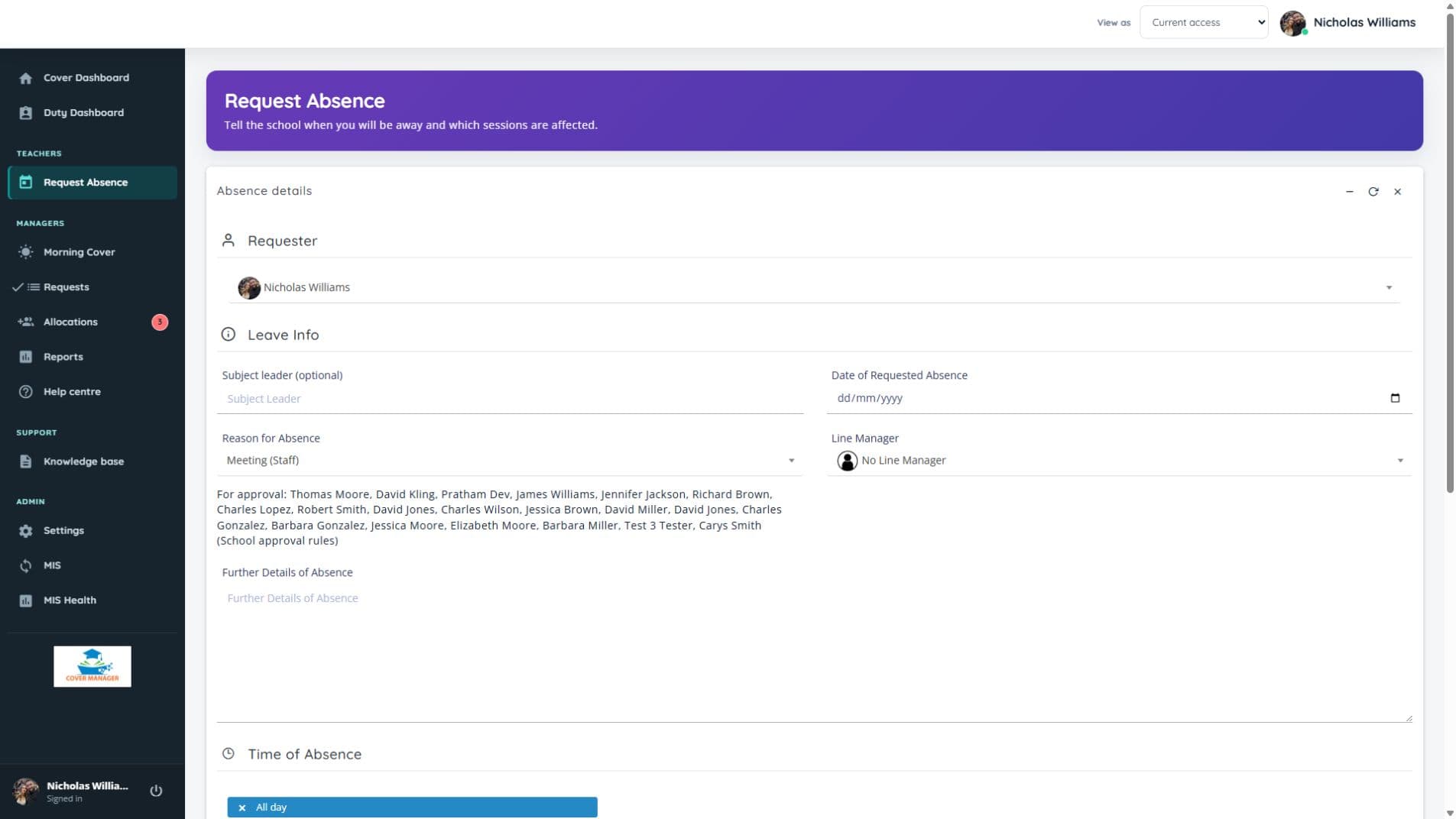
Schools can choose who approves each absence reason: the headteacher, a cover manager or the existing school rules. Staff see the approver before submitting, and nobody can approve their own request. Absence reasons are only ever shown to managers, and the Requests page shows each manager everything waiting for a decision.
- Staff submit absence requests with the sessions that need cover
- Set approval responsibility by absence reason
- Optionally send a cover manager's own request to the headteacher
- Approve or decline with a comment, and the requester is always told the decision
- Attach documents securely, visible only to the requester and the people who decide
- Schools write their own confirmation statements that staff agree to before submitting
- Staff can change a request; managers can change or cancel an absence for anyone
- Approved requests feed straight into the dashboard and allocation views
- An audit-friendly workflow — decisions are recorded, not lost in email
Find suitable cover and keep the final decision
Cover Manager highlights approved sessions that still need cover and can suggest suitable staff with an explanation. It only suggests people who are actually free: not teaching, not absent or awaiting an absence decision, and in school if they work part time. Managers review, change, approve or reject suggestions before cover is confirmed.
- Approved but unallocated count on the dashboard
- Allocated vs unallocated status per session
- Partial allocation visibility
- Explainable suggestions using availability and workload across both lesson cover and duties, so nobody is handed a lesson and a duty on the same day where it can be avoided
- Optional school rules for staff groups, teaching phases and fallback order
- Part-time working patterns, so nobody is offered cover on a day or time they are not in school
- Fairness counted this week and since 1 September, with registrations and dismissals left out of the count
- An Auto Allocations week view, with today shown first
- Availability and conflicts checked again when cover is confirmed
- Clear date labels distinguish past, current and upcoming sessions
MIS-integrated cover planning
Cover Manager is built to work with school MIS and timetable data through Wonde. This allows approved absences, cover allocation and Morning Cover to be enriched with the lesson context cover teams need — including subject, teaching group, room, period, department, year group and original teacher where available.
Cover Manager can use Wonde-connected MIS and timetable data to show what is actually affected by an absence — which class, which room, which period and which subject — so cover teams can make faster decisions and produce clearer daily cover sheets.
- Subject, group and room context on affected sessions
- Period and timetable information in Morning Cover
- Department and year group context where available
- Original teacher shown on daily cover rows
- Better daily cover sheets with timetable detail
- Reduced manual checking between systems
Connect Cover Manager to your school MIS through Wonde
Cover Manager uses Wonde to connect with the MIS and timetable data your school already maintains, helping cover teams see subject, group, room, period and teacher context alongside approved absences and daily cover planning.
One connection route for MIS context
Wonde provides a secure connection between schools and approved third-party applications. Cover Manager can use this route to bring timetable context into Morning Cover, Allocations and the daily cover sheet.
Your school MIS
- SIMS
- Arbor
- Bromcom
- iSAMS
- IRIS
…and other Wonde-connected systems
Wonde
Secure MIS connection route
Cover Manager
Timetable context, where cover teams need it
- Morning Cover
- Allocations
- Daily cover sheet
Through Wonde, Cover Manager can support schools using leading MIS and timetable systems including SIMS, Arbor, Bromcom, iSAMS, IRIS and others, subject to onboarding, permissions and the data available from the school's MIS.
Availability depends on the school's MIS, Wonde permissions and the timetable data made available during onboarding.
Cover work when you need it, hidden when you do not
Some schools want to collect cover work and instructions through the system. Others only need absence approval and allocation visibility. Cover Manager supports both approaches. Cover Work can be enabled or disabled in settings, and the interface adapts so schools only see what they use.
- Attach instructions and work to cover sessions
- Track whether cover work has been added
- Disable Cover Work entirely if not required
- Existing cover work data is preserved if re-enabled
Dashboards and reports for cover visibility
Cover Manager gives managers visibility across absence activity, pending approvals, unallocated sessions, allocation status and trends. Reports help schools understand absence patterns, cover workload and operational pressure over time.
- Dashboard KPIs for the week — approvals, allocation, absences
- Pending approvals at a glance
- Allocation status across sessions
- Absence trends by reason over time
- Cover workload across staff
- Reports filtered by reason, date, session or staff where available
Secure sign-in and role-based access
Cover Manager supports school Microsoft Entra sign-in and keeps access role-based. Each school has its own hosted application and database. Staff, line managers, cover managers, duty managers, headteachers and administrators see the tools appropriate to their role.
- Microsoft Entra sign-in through the shared Cover Manager application
- Role-based access, including a dedicated Duty Manager capability
- Manager-only views such as Morning Cover and Allocations
- Absence reasons shown only to managers, whatever the staff calendar setting
- Request notes and attachments visible only to the requester, recorder and deciders
- Audit-friendly approval and allocation workflow
- Admin-controlled settings, users and access levels
- Cloud-hosted by Education Host on a school subdomain (school.covermanager.co.uk), with backups and support included
From absence request to daily cover sheet
The whole cover workflow, in six steps.
- 1
Staff request absence
A member of staff submits an absence request with the sessions that need cover.
- 2
Manager reviews
The approver selected by the school's absence rules reviews and approves or rejects the request.
- 3
Approved absence appears
Approved absences show immediately on the dashboard and in Morning Cover.
- 4
Unallocated sessions surface
The cover manager sees exactly which approved sessions still need cover.
- 5
Cover is allocated
Cover is allocated to staff, with partial allocation handled properly. Their duties and any cover they were due to give are released too.
- 6
Daily cover sheet goes out
The cover sheet is printed or exported, staff see their cover on the dashboard and are emailed the day before.
Built for the people who run school cover
Cover managers
Run Morning Cover, allocate sessions and keep the day on track.
Headteachers & senior leaders
Approve requests and keep oversight of absence and cover pressure.
Line managers
Review and approve absence requests for their teams.
Duty managers & school administrators
Organise supervision rotas, manage open duties and maintain school settings.
Teaching & support staff
Request absence, see lesson cover and volunteer for duties when eligible.
IT / MIS teams
Microsoft Entra sign-in, role-based access and MIS-aware timetable context.
See it in a demo
Cover Manager is available from Education Host and is ready to demo. Pricing is confirmed as part of a demo and scoping conversation — book a demo to see the platform and discuss what's right for your school.
A clearer route from setup to your first school day
Education Host supports your school's setup, from its own hosted installation to Microsoft sign-in and MIS staff linking. Your IT team does not need to create a separate Microsoft app registration for Cover Manager.
Share your school details
Provide your Microsoft Entra Tenant ID and the details needed to scope your MIS connection.
Approve Microsoft access once
A school Entra administrator grants consent to the shared Cover Manager application. Education Host configures your school's sign-in.
Connect and prepare staff
Import and link staff through your MIS, then configure roles, absence reasons, cover rules and duty settings around your school.
Check the working day
Verify staff sign-in, approval routes and cover workflows. Help centre access is connected as part of the school's setup.
MIS availability depends on your provider, permissions and data. Normal staff accounts must be prepared and linked before first sign-in; Microsoft sign-in does not create them automatically.
Cover Manager — frequently asked questions
Answers to common questions about Cover Manager, Education Host's school cover management software.
What is Cover Manager?
Cover Manager by Education Host is school cover and duty management software. It brings staff absence, configurable approvals, Morning Cover, manager-reviewed cover suggestions, duty rotas and daily cover sheets into one hosted platform, with MIS timetable context where available. Optional features such as Cover Work can be switched off if your school does not need them.
What is Morning Cover?
Morning Cover is Cover Manager's daily operational view for cover teams. It shows today's approved absences, the sessions that are still unallocated, the cover already allocated and the MIS timetable context behind each session — and produces the printable daily cover sheet and CSV export for the school day.
What does Duty Manager do?
Duty Manager organises weekly supervision rotas for gates, breaks, lunch and other school duties. Managers set staffing requirements and assign eligible staff, while eligible staff can volunteer; the rota highlights gaps and provides a printable weekly sheet. It works independently of MIS sync. Schools can also set who is allowed to cover each duty, record clubs and commitments that block or count as duty time, and see a Duty load report.
Can we stop the same people always being asked to cover?
Yes. Cover Manager counts lesson covers and duties together for the week. When a manager assigns duty cover, staff who have picked up the least come first and anyone already covering a lesson that day is listed last. Lesson cover suggestions apply the same balance in reverse, and every suggestion shows its reason.
Does Cover Manager handle approval workflows?
Yes. Cover Manager lets schools choose approval responsibility by absence reason, including headteacher, cover manager or existing school rules. Staff see the approver before submitting and cannot approve their own requests; managers can separately record unexpected absence from Morning Cover.
Does Cover Manager allocate cover automatically?
Cover Manager can generate explained cover suggestions, but a manager must review and approve them before cover is confirmed. Optional school cover rules set staff-group priorities, teaching-phase preferences and workload limits, alongside availability and conflict checks.
Does Cover Manager integrate with our MIS?
Yes. Cover Manager is built to connect to school MIS and timetable data through Wonde, which supports leading systems such as SIMS, Arbor, Bromcom, iSAMS, IRIS and others. Where the relevant data is available, it shows subject, group, room, period, department, year group and original teacher context in Morning Cover, Allocations and the daily cover sheet. The exact setup depends on your MIS, Wonde permissions and the data available during onboarding.
How does school onboarding work?
Education Host configures your school's hosted installation, Microsoft sign-in and MIS connection. Your school supplies its Entra Tenant ID, an administrator to approve the shared application once and the MIS details needed for setup; school IT does not create a separate Microsoft app registration. Staff are imported and linked before their first sign-in.
Does Cover Manager support Microsoft Entra sign-in?
Yes. Cover Manager supports school Microsoft Entra sign-in through a shared application, with role-based access in each school's own cloud-hosted installation on a school.covermanager.co.uk subdomain, with backups and support included. Normal staff accounts must already exist and be linked before first sign-in.
What happens to cover and duties when an absence is approved?
The lessons the person teaches during the absence are listed for cover, duties that clash with it are released, and any cover they were due to give is handed back for reallocation. Duty managers can choose to be emailed about released duties.
Does Cover Manager handle part-time staff?
Yes. Everyone is treated as full time unless the school records otherwise. Record the days someone does not work, or the times they arrive or leave, and they will not be offered lesson cover or duties outside those hours.
Is there a Cover Manager mobile app?
Yes. Cover Manager for Education is on the App Store for iPhone and iPad. Staff sign in with their school code and Microsoft account to request absence, and managers can decide requests and review cover suggestions. Each school chooses whether staff can use it.
Can we book a demo?
Yes. Book a Cover Manager demo with Education Host to see Morning Cover, approval routes, cover suggestions, Duty Manager and daily cover sheets, and discuss onboarding and pricing for your school.
See Cover Manager in a demo
Explore Morning Cover, explained cover suggestions and Duty Manager, then talk through the Microsoft and MIS setup for your school.